






Pen Display vs Pen Tablet: Which Should You Buy?
- Core difference: A pen tablet is a screenless drawing surface; a pen display has a built-in screen that you draw directly on — both send identical data to your software.
- Price gap: XPPen pen tablets in India start at Rs 2,999; the entry-level pen display (Artist 13 2nd Gen) starts at Rs 16,999 — a significant investment difference.
- Beginners: A pen tablet is the recommended starting point for most new digital artists — it teaches core skills at a fraction of the pen display cost.
- Learning curve: Pen tablets require adjustment to the hand-eye disconnect; pen displays eliminate this but add cable management and desk space requirements.
- Professional use: Many professional artists, animators, and illustrators use pen displays daily; others prefer pen tablets for their portability and simpler setup.
- Teaching: Pen tablets are more practical and cost-effective for online teaching — a pen display adds cost without meaningful teaching advantage.
- 1. The Fundamental Difference Between Pen Displays and Pen Tablets
- 2. How Each Type Works
- 3. Price Comparison in India 2026
- 4. Who Should Choose a Pen Tablet?
- 5. Who Should Choose a Pen Display?
- 6. Key Specifications to Compare
- 7. Common Misconceptions About Both Types
- 8. Setup and Workspace Considerations
- 9. The Upgrade Path: When to Move from Tablet to Display
- 10. Who Uses Each Type in India?
- 11. Related Reading
- 12. Frequently Asked Questions
The pen display vs pen tablet decision is one of the most common purchase dilemmas for Indian digital artists, designers, and online educators in 2026. Both types of drawing input devices serve the same fundamental purpose, both use the same stylus technology, and both produce the same results in your drawing software. The difference is in how the experience of using them feels, how much they cost, and how well they fit different working environments and skill levels.
At XPPen India, both categories are represented across multiple price points. The pen tablet range covers everything from the Rs 2,999 Star G640 to the Rs 9,099 Deco Pro series. The pen display range starts at Rs 16,999 with the Artist 13 2nd Gen and extends to professional 4K displays at Rs 64,999 and above. This guide helps you understand which category is right for your situation before you spend.
Last reviewed: April 2026
1. The Fundamental Difference Between Pen Displays and Pen Tablets
A pen tablet is a flat surface with no screen. You draw on the tablet with a stylus, and the strokes appear on your separate computer monitor. The tablet itself is simply an input device, like a mouse but pressure-sensitive. You never look at the tablet while drawing — your eyes are on the monitor.
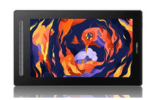
A pen display is a screen that you also draw on. It connects to your computer and functions as a secondary monitor, but it has the same pressure-sensitive surface as a pen tablet built directly behind the glass. You draw on the display surface and immediately see your strokes appear exactly where your pen touches the screen, because the drawing surface and the viewing surface are the same object.
The core insight: The drawing software receives identical data from both a pen tablet and a pen display. The difference is entirely in the user experience, not in what is technically possible. Both types can produce professional-quality digital artwork.
2. How Each Type Works
Pen Tablet Operation
When you move the stylus across a pen tablet's active area, the tablet maps those movements to corresponding positions on your monitor. The entire active area of the tablet represents your entire screen. Moving the stylus from the left edge to the right edge of the tablet moves the cursor from the left to the right of your monitor. This mapping relationship is what beginners need to adjust to — your hand is moving over the tablet but your eyes are watching a screen that is separated from your hand by a foot or more of desk space.
Pen Display Operation
A pen display connects to your computer both as a display (via HDMI or DisplayPort) and as a drawing input device (via USB). Your computer treats it as a second monitor. You can move application windows onto the pen display screen and draw directly on them. Because your pen touches the same surface you are viewing, the hand-eye relationship is identical to drawing on paper. The learning curve of the position disconnect disappears entirely.
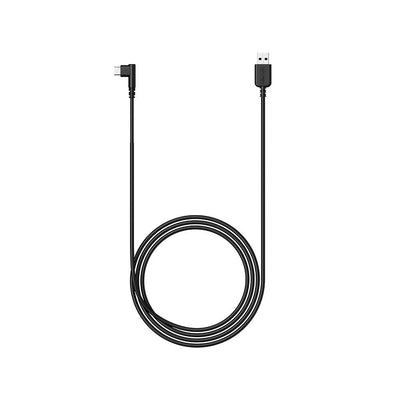
Most pen displays require two to three cables for full functionality — a power cable, a display cable (HDMI or USB-C), and a USB data cable. Newer XPPen pen displays support single USB-C connection for both power and data on compatible computers, significantly reducing cable management complexity.
3. Price Comparison in India 2026
| Category | Model | Price (India) | Active Area | Key Feature |
|---|---|---|---|---|
| Entry Pen Tablet | Star G640 | Rs 2,999 | 6 x 4 inches | Compact, Chrome OS support |
| Mid Pen Tablet | Deco 01 V3 | Rs 6,499 | 10 x 6.27 inches | Android support, accessories included |
| Pro Pen Tablet | Deco Pro Medium | Rs 9,099 | 10 x 6.27 inches | Wireless, red dial, X3 chip |
| Entry Pen Display | Artist 13 2nd Gen | Rs 16,999 | 13.3 inches (screen) | Fully laminated, 120% sRGB |
| Mid Pen Display | Artist 22 Plus | Rs 23,999 | 21.5 inches (screen) | Matte surface, large format |
| Pro Pen Display | Artist Pro 24 Gen 2 4K | Rs 49,999 | 23.8 inches (screen) | 4K resolution, 16K pressure |
The price gap between the top-end pen tablet and the entry-level pen display is approximately Rs 8,000 in the XPPen India lineup. This is a meaningful investment threshold for most Indian buyers, and understanding whether it is justified for your specific use case is the central purpose of this guide.
4. Who Should Choose a Pen Tablet?
Beginners and Students
If you are new to digital art, a pen tablet is the right starting choice. The hand-eye coordination adjustment teaches a fundamental skill that serves you regardless of what hardware you use in the future. The lower cost leaves budget for quality drawing software, learning resources, and potentially a better computer setup. The Deco 640 or Star G640 provides everything a beginner needs to develop real digital art skills.
Online Teachers and Educators
Teachers who use drawing tablets for annotation, whiteboard writing, and diagram creation during online classes benefit from pen tablet portability and simplicity. A pen tablet connects in seconds, has no display cable management overhead, and works on any computer. The Star 03 V2 and Deco 01 V3 are the most popular teacher choices in India precisely because they deliver natural pen writing at a practical price with no unnecessary complexity.
Artists Who Prioritise Portability
For digital artists who work in multiple locations, travel regularly, or draw in outdoor settings, a pen tablet is significantly more portable than a pen display. A compact pen tablet fits in a laptop bag. A pen display requires a power source, display cable, and dedicated desk space. The Deco Pro wireless series adds Bluetooth connectivity, making it the ultimate portable professional pen tablet option from XPPen India.
Find the Right XPPen for Your Workflow
From compact beginner pen tablets to professional 4K pen displays, XPPen India covers every creative need. Free pan-India delivery and EMI from Rs 999 per month.
Browse the Full XPPen Range5. Who Should Choose a Pen Display?
Intermediate to Advanced Artists Ready to Upgrade
Artists who have used a pen tablet for six months or more and feel that the hand-eye disconnect is genuinely slowing their work are excellent candidates for a pen display upgrade. The Artist 13 2nd Gen at Rs 16,999 is the most common upgrade path for this group, offering a fully laminated display that immediately makes detailed, precise work faster and more intuitive.
Professional Illustrators and Animators
Artists who produce detailed character illustrations, frame-by-frame animation, or complex digital paintings find that a pen display significantly reduces the time spent on precision work. Drawing directly on the screen eliminates the mental overhead of position mapping and allows longer, more focused creative sessions. Many professional Indian artists use the Artist 22 Plus or Artist Pro series as their primary studio tool.
Designers Who Value Colour Accuracy
Graphic designers, photographers, and UI/UX professionals who need precise colour calibration for client work benefit from the high colour gamut displays in the XPPen Artist series. The Artist 13 2nd Gen covers 120% sRGB; the Artist Pro 24 Gen 2 4K delivers professional colour accuracy for print and digital media production. For designers whose work quality depends on accurate colour reproduction, the pen display's built-in calibrated screen eliminates one variable in the production chain.
6. Key Specifications to Compare
Active Area vs Screen Size
For pen tablets, the relevant specification is the active area — the portion of the tablet surface that reads pen input, measured in inches. For pen displays, screen size (the display diagonal) is the primary specification, because the entire visible screen area is the drawing surface. A 13-inch pen display has a larger effective drawing area than a 6x4 inch pen tablet, but a smaller area than a 10x6 inch pen tablet when measured purely by drawing surface dimensions.
Lamination and Parallax
On a pen display, full lamination is a critical quality indicator. A fully laminated display has no air gap between the glass and the display panel, which eliminates the visual offset (parallax) between where the pen touches the glass and where the stroke appears on screen. All XPPen Artist series pen displays above the entry level feature full lamination. Non-laminated pen displays at the very budget end of the market show a perceptible gap that many artists find distracting during detailed work.
When evaluating a pen display, confirm that it is fully laminated before purchasing. XPPen lists lamination as a confirmed specification in the product details for each Artist series model. Fully laminated displays are the standard for the XPPen Artist 13 2nd Gen and above.
7. Common Misconceptions About Both Types
Myth: A Pen Tablet Cannot Produce Professional Results
This is false. Professional illustrators, concept artists, animators, and designers produce award-winning, commercially published work on pen tablets every day. The drawing tablet does not limit the artistic quality — the artist's skills and software settings do. A pen tablet sends identical pressure and position data to your software as a pen display. The output quality is determined by how you use the tool, not which type of tool you are using.
Myth: A Pen Display Is Always Better
Also false. A pen display adds cost, cable complexity, and desk space requirements that may not be justified for every workflow. For note-taking, annotation, online teaching, and casual illustration, a pen tablet is often the objectively better choice because it is simpler, more portable, and costs significantly less. The pen display's advantages are specific to workflows where drawing directly on the screen saves meaningful time or effort — typically detailed illustration, animation, and precision design work.
Myth: You Will Immediately Be Better After Getting a Pen Display
The pen display removes the hand-eye coordination barrier, but your artistic skills transfer from the pen tablet exactly as they are. If your line quality, proportioning, and shading technique are underdeveloped on a pen tablet, they will be the same on a pen display. The pen display is a workflow tool, not a skill amplifier. This is why beginners are consistently advised to develop foundational skills on a pen tablet before upgrading.
8. Setup and Workspace Considerations
Setting up a pen tablet is the simpler of the two processes. Connect the USB cable, install the driver, and the tablet is ready to use in under ten minutes. The tablet adds no hardware to your existing monitor setup. You can use it at a desk, on a lap, or on any flat surface.
Setting up a pen display requires more planning. You need desk space for the display itself, a route for two to three cables (power, HDMI/DisplayPort, and USB), and a comfortable viewing angle, typically achieved with an adjustable stand or monitor arm. Many artists position the pen display directly in front of them and move their regular monitor to the side, creating a primary drawing surface with the pen display and a secondary reference and tools monitor alongside it.
9. The Upgrade Path: When to Move from Tablet to Display
The right time to upgrade from a pen tablet to a pen display is specific and identifiable. You are ready if: you have been using a pen tablet regularly for at least six months and feel proficient, you find yourself repeatedly frustrated by the hand-eye disconnect during precise, detailed work, your income from digital art (or your budget as a student) justifies the Rs 16,999 to Rs 24,999 investment, and you have a desk workspace that can accommodate the pen display comfortably.
If all four of those conditions are true, the XPPen Artist 13 2nd Gen is the natural first pen display for most Indian artists making this transition. Its 13.3-inch size is large enough to provide a significantly better drawing experience than a standard pen tablet's physical area, while its Rs 16,999 price point makes it accessible without the commitment of a larger professional display. Artists who outgrow the 13-inch size typically find the Artist 22 Plus the ideal professional upgrade.
10. Who Uses Each Type in India?
Both pen tablets and pen displays have strong, distinct user communities in India. Understanding who uses each type helps clarify where each excels in real working conditions.
- A pen tablet and a pen display produce identical artistic results in your software — the difference is entirely in the drawing experience, not the output quality.
- For beginners, students, and teachers in India, a pen tablet is the right choice: lower cost, simpler setup, and more portable than a pen display.
- The minimum budget for a quality pen display experience in India is Rs 16,999 (Artist 13 2nd Gen) — pen displays below this price often lack full lamination.
- Upgrade from pen tablet to pen display when you have six or more months of tablet experience and find the hand-eye disconnect genuinely limits your detailed work.
- Pen displays require desk space planning and cable management that pen tablets do not — factor this into your workspace assessment before buying.
- Professional digital artists in India use both types successfully; the choice is about workflow fit, not artistic capability.
11. Related Reading
12. Frequently Asked Questions
Is a pen display worth it over a pen tablet for beginners?
For most beginners, a pen tablet is the better starting choice. It costs significantly less, teaches hand-eye coordination that transfers well to any future hardware, and provides the same drawing software functionality as a pen display. A pen display becomes worth the investment once you have developed foundational digital art skills and find that the hand-eye disconnect is genuinely limiting your speed or precision. The XPPen Deco 640 or Star G640 is the recommended starting point for beginners in India.
What is the minimum budget for a good pen display in India?
The XPPen Artist 13 2nd Gen at Rs 16,999 is the most affordable pen display in India that meets professional quality standards, with a fully laminated 13.3-inch display, 8192 pressure levels, and the X3 chip stylus. Below this price point, pen displays may have air gaps, lower colour accuracy, or reduced build quality that affects the drawing experience.
Can a pen tablet do everything a pen display can?
Yes, in terms of software functionality. A pen tablet sends exactly the same pressure, position, and tilt data to your drawing software as a pen display. Both produce identical results in Photoshop, Krita, Clip Studio Paint, and any other application. The difference is entirely in the drawing experience — a pen display lets you draw on what you see, which many artists find more comfortable and intuitive for detailed work.
Does a pen display replace my computer monitor?
Not typically. Most pen displays are secondary displays that connect to your computer alongside your primary monitor. You do your drawing on the pen display while your system interface, tools, and panels appear on the primary monitor. Standalone drawing tablets like the XPPen Magic Drawing Pad run their own operating system and do not need an external computer at all.
Which is better for online teaching, a pen tablet or pen display?
For online teaching, a pen tablet is generally more practical and cost-effective. Teachers need to write, annotate, and diagram clearly on screen — capabilities a pen tablet delivers equally well at a fraction of the cost of a pen display. The XPPen Star 03 V2 and Deco 01 V3 are both widely used by Indian online educators for Zoom, Google Meet, and Teams-based teaching.
Do pen displays cause eye strain during long work sessions?
Pen displays with matte anti-glare surfaces, like the XPPen Artist 22 Plus, significantly reduce eye strain compared to glossy displays during long sessions. Working at appropriate brightness settings and taking regular breaks is important with any display. Artists who work 6 to 8 hours daily on pen displays generally recommend matte-finish models for comfort.
Can I use an XPPen pen display with any software?
Yes. XPPen pen displays are compatible with Photoshop, Illustrator, Clip Studio Paint, Krita, MediBang, SAI, GIMP, Blender, and all major creative applications on Windows, macOS, and Linux. Check the XPPen FAQ page for full per-model compatibility details.
How much desk space does a pen display require?
A 13-inch pen display like the Artist 13 2nd Gen has a footprint roughly comparable to an A4 sheet of paper. A 22-inch pen display like the Artist 22 Plus requires dedicated desk area similar to a large monitor. Most artists angle their pen display at 20 to 45 degrees using a stand or adjustable arm, which is more ergonomically comfortable than lying flat and also reduces desk footprint.


