






XPPen vs Wacom: Which Drawing Tablet Wins in India?
- Price advantage: XPPen tablets deliver comparable or superior specifications to Wacom equivalents at significantly lower price points in the Indian market.
- Pressure parity: Wacom Intuos models use 4096 pressure levels, while Wacom Intuos Pro and Cintiq models offer 8192 pressure levels. XPPen starts at 8192 pressure levels on entry models like Star G640 and reaches 16,384 pressure levels on newer 16K models like Deco 01 V3 and the Artist Pro range.
- Software compatibility: XPPen and Wacom tablets are equally compatible with Photoshop, Clip Studio Paint, Krita, GIMP, and all major creative platforms.
- India availability: XPPen India has physical retail presence at Croma, Reliance Digital, and Vijay Sales, plus a full online store with EMI options.
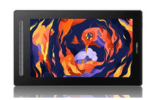
- Professional range: XPPen's Artist Pro series and Artist Ultra 16 compete directly with Wacom Cintiq Pro at considerably more accessible Indian prices.
- Warranty and support: Both brands offer structured warranty and support in India; XPPen's 12-month replacement warranty is well-regarded by the local creative community.
- 1. The Drawing Tablet Market in India: Two Major Brands
- 2. How XPPen and Wacom Technology Compares
- 3. Price Comparison: XPPen vs Wacom India 2026
- 4. Pen Tablets: Entry-Level Comparison
- 5. Pen Displays: Mid-Range and Professional Comparison
- 6. Build Quality and Stylus Experience
- 7. Driver Software and Customisation
- 8. Which Brand Should You Choose?
- 9. Making the Switch from Wacom to XPPen
- 10. Who Chooses XPPen in India?
- 11. Related Reading
- 12. Frequently Asked Questions
The XPPen vs Wacom question is one of the most searched topics among Indian artists, design students, and online teachers looking to buy their first or next drawing tablet. Both are legitimate, respected brands with global customer bases — but they occupy genuinely different positions in the Indian market when it comes to pricing, availability, and value. This comparison is built on direct product knowledge, real hardware specifications, and a clear understanding of what Indian buyers actually need from their drawing tools.
XPPen has been manufacturing drawing tablets since 2005 and is now the second largest pen tablet brand in Japan by market share, according to verified market research. In India, XPPen India operates with physical retail at Croma, Reliance Digital, and Vijay Sales alongside a full online store offering EMI plans. This guide gives you an honest, specification-by-specification comparison across every price tier so you can make an informed decision rather than a brand-loyalty-driven one.
Whether you are comparing the XPPen graphic tablet range against Wacom's Intuos line, or evaluating the Artist pen display series against the Wacom Cintiq, this article has the data you need.
Last reviewed: April 2026
1. The Drawing Tablet Market in India: Two Major Brands
The Indian drawing tablet market is dominated by two brands: Wacom, the long-established Japanese company that essentially invented the consumer drawing tablet category, and XPPen, the Chinese brand that has rapidly become one of the most widely used alternatives globally. Both offer a complete product range from affordable beginner tablets to professional pen displays, but their pricing strategies for the Indian market are very different.
Wacom's reputation in India — and globally — is built on the Intuos line for beginners and the Cintiq line for professionals. These remain technically strong products with excellent driver support. However, their Indian pricing reflects a premium positioning that puts even entry-level Wacom hardware out of reach for many students and hobbyists. XPPen's strategy has been the opposite: deliver comparable or superior specifications at pricing that is accessible to a much wider segment of the Indian creative market.
Market context: As of 2025, XPPen operates in 163 countries and has served more than 10 million digital art creators worldwide. In Japan, it holds an 8.4% market share, making it the second largest pen tablet brand in the country after Wacom.
2. How XPPen and Wacom Technology Compares
Both XPPen and Wacom use electromagnetic resonance (EMR) technology as the foundation of their pen tablet systems. In EMR, the tablet surface generates a magnetic field that the stylus interacts with to report position, pressure, and tilt — with no battery or Bluetooth required in the pen itself. The result in both cases is a battery-free stylus that feels natural to use and works reliably across extended drawing sessions.
Pressure Sensitivity
Both brands offer 8192 pressure levels as their mid-range standard, which is the professional industry benchmark. XPPen has moved ahead at the high end with the X3 Pro chip stylus, which delivers 16,384 pressure levels — a specification not yet available in Wacom's standard consumer or professional range as of 2026. For the vast majority of drawing workflows, 8192 levels is more than sufficient, but XPPen's lead at the top tier is worth noting for artists who prioritise maximum stylus nuance.
Tilt Sensitivity
Both brands support tilt sensitivity on their mid-range and professional models, typically up to 60 degrees. Tilt reading lets the software simulate the angle of a real brush or pencil, enabling more expressive shading and brush effects. Entry-level models from both brands may have reduced tilt support, so check individual model specifications when buying at the budget tier.
Report Rate and Latency
XPPen's X3 chip technology, present in the Deco series and Artist series, delivers an exceptionally low activation force of approximately 3 grams and a high report rate that effectively eliminates perceptible lag during fast strokes. According to independent digital art hardware reviews published by major creative publications, modern XPPen tablets using the X3 chip are on par with or exceed Wacom's mid-range models in stroke responsiveness tests.
3. Price Comparison: XPPen vs Wacom India 2026
| Category | XPPen Model | XPPen India Price | Wacom Equivalent | Wacom India Price (approx.) |
|---|---|---|---|---|
| Entry pen tablet | Star G640 | Rs 2,999 | Wacom Intuos Small | Rs 5,500 to Rs 7,000 |
| Mid-range pen tablet | Deco 01 V3 | Rs 6,499 | Wacom Intuos Medium | Rs 9,500 to Rs 12,000 |
| Professional pen tablet | Deco Pro Medium | Rs 9,099 | Wacom Intuos Pro Medium | Rs 18,000 to Rs 22,000 |
| Entry pen display (13 inch) | Artist 13 2nd Gen | Rs 16,999 | Wacom Cintiq 13 | Rs 45,000 to Rs 55,000 |
| Professional pen display (22 inch) | Artist 22 Plus | Rs 23,999 | Wacom Cintiq 22 | Rs 65,000 to Rs 75,000 |
The price difference is substantial at every tier. An Indian artist choosing an entry pen display faces paying roughly three times more for a Wacom Cintiq 13 than for the XPPen Artist 13 2nd Gen, for a comparable feature set. This pricing gap is the primary reason that XPPen has achieved such rapid adoption among Indian digital artists, students, and educators.
4. Pen Tablets: Entry-Level Comparison
At the entry level, the comparison is straightforward. The XPPen Star series — led by the Star G640 at Rs 2,999 — offers a larger active area, equivalent pressure levels, and a battery-free stylus at roughly half the price of the Wacom Intuos Small. The Wacom Intuos does benefit from slightly better software bundling and a more established driver legacy, but for day-to-day drawing, annotation, and online teaching, the XPPen Star series delivers everything a beginner needs at a far more accessible cost.
Stepping up to the Deco series, XPPen's competitive advantage becomes even more pronounced. The Deco 01 V3 at Rs 6,499 delivers a 10x6.25 inch active area with Android support, included scratch guard, and drawing glove — accessories that Wacom sells separately. At a price point that undercuts the Wacom Intuos Medium by 30 to 40%, the Deco 01 V3 consistently emerges as the recommended alternative across Indian digital art communities and education forums.
Experience XPPen Quality for Yourself
Browse the full XPPen India pen tablet lineup. Free pan-India delivery, EMI from Rs 999 per month, and a 12-month replacement warranty on every purchase.
Shop XPPen Pen Tablets5. Pen Displays: Mid-Range and Professional Comparison
The pen display category is where XPPen's value proposition is most dramatic. The Artist 13 2nd Gen at Rs 16,999 directly competes with the Wacom Cintiq 13, which is priced at Rs 45,000 to Rs 55,000 in India. Both offer a 13-inch fully laminated display, comparable colour gamut, and 8192 pressure levels. The XPPen model adds the X3 chip stylus with 3-gram activation force, a specification that represents a genuine improvement over Wacom's standard stylus activation threshold in this tier.
At the professional level, the Artist Pro series and Artist Ultra 16 deliver 4K resolution, 16K pressure sensitivity, and professional colour calibration. The Artist Ultra 16 received recognition at the Dezeen Awards 2025 and is positioned as a direct competitor to the Wacom Cintiq Pro. Its Indian price makes it accessible to freelancers and mid-size studios that would previously have had to budget for a Cintiq Pro at two to three times the cost.
The Lamination Difference
One specification that matters significantly in pen displays is whether the display is fully laminated. Full lamination eliminates the air gap between the glass and the display panel, reducing the parallax effect — the visual offset between where the pen tip touches the glass and where the stroke appears on screen. The XPPen Artist series features fully laminated displays from the Artist 13 upward, which is the same standard as Wacom Cintiq displays. This is not always the case with budget pen displays from lesser-known brands, making it an important point of parity with Wacom at the XPPen price.
6. Build Quality and Stylus Experience
Wacom's reputation for premium build quality is well deserved — particularly the Intuos Pro and Cintiq Pro series, which feature a distinctive textured surface that many professional artists prefer. The texture provides a paper-like resistance that makes drawing feel more natural, and the pen's ergonomic design has been refined over decades of feedback from professional illustrators.
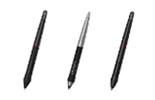
XPPen's recent hardware has significantly narrowed the build quality gap. The Deco Pro series features a premium matte textured surface and sturdy chassis that compares favourably to the Wacom Intuos Pro in durability and feel. The X3 chip stylus is widely praised for its accuracy, virtually zero activation force, and ergonomic comfort during extended drawing sessions. Multiple Indian artists with professional credentials have publicly noted that after switching from Wacom to XPPen, their drawing experience was essentially unchanged.
XPPen replacement nibs and styluses are available through the official accessories store. Genuine XPPen nibs are considerably more affordable than Wacom replacement nib sets, which is a meaningful long-term cost advantage for heavy users.
7. Driver Software and Customisation
Both XPPen and Wacom provide dedicated driver software for Windows, macOS, and Linux. The driver is where you configure pressure curves, button assignments, screen mapping, and tilt sensitivity. For most users, both drivers are capable and stable — the core customisation options are essentially equivalent.
Wacom's driver has a longer history and slightly more advanced multi-display management features that can be useful in complex multi-monitor professional setups. XPPen's driver is cleaner and more intuitive for most standard setups, and the company releases driver updates regularly. The XPPen India FAQ covers common driver installation questions for all models.
One important practical note: if you are switching from Wacom to XPPen, always perform a complete uninstall of the Wacom driver before installing the XPPen driver. Leaving both drivers installed simultaneously is the primary cause of pen malfunction reports during the transition period.
8. Which Brand Should You Choose?
Choose XPPen If:
You are buying your first drawing tablet and want the best specifications per rupee spent. You are a teacher, student, or hobbyist who needs reliable digital drawing capability without a premium price. You are an intermediate artist ready to try a pen display and find the Wacom Cintiq pricing prohibitive. You are a professional who wants to maximise studio hardware budget — multiple XPPen tablets for the price of one equivalent Wacom setup is a real option for larger teams.
Wacom May Still Be the Choice If:
You are a senior professional artist with years of investment in Wacom accessories, drivers, and muscle memory who finds switching disruptive. You work in a studio environment where Wacom is the specified tool and driver compatibility with specialised studio software is non-negotiable. You specifically prefer the texture and feel of Wacom's Intuos Pro surface and find no alternative matches it for your tactile preference.
If you are currently using a Wacom Intuos and are considering an upgrade to a pen display, this is an excellent opportunity to evaluate XPPen. The Artist 13 2nd Gen at Rs 16,999 delivers a fully laminated pen display experience that would cost three times as much in the Wacom Cintiq range.
9. Making the Switch from Wacom to XPPen
For artists who are considering switching from Wacom to XPPen, the transition is considerably smoother than many expect. The drawing experience — pressure response, stroke quality, tilt behaviour — is functionally equivalent when you are inside your drawing software. The software does not know which brand of tablet you are using; it simply receives pressure and position data from the driver. If that data is accurate and responsive, the experience is the same.
The practical steps are: uninstall the Wacom driver completely, install the XPPen driver for your new model, connect the tablet, open the driver panel, and spend 15 minutes configuring your pressure curve and shortcut keys to match your previous setup. Most artists report being fully comfortable with their XPPen setup within one or two drawing sessions. The adjustment period is shorter for pen tablets; pen display users may need a few extra sessions to recalibrate to the new screen's colour profile and size.
10. Who Chooses XPPen in India?
The XPPen India community spans a wide range of creative professionals and learners. Understanding who is choosing XPPen over Wacom in the Indian market helps illustrate where the brand's value proposition resonates most strongly.
- XPPen and Wacom use the same core EMR technology and deliver equivalent drawing experiences at the software level — the primary difference is price.
- At every comparable tier, XPPen offers lower Indian pricing: often 40 to 60% less for pen tablets, and up to 70% less for pen displays like the Artist 13 vs Wacom Cintiq 13.
- XPPen now leads the industry in maximum pressure sensitivity with 16,384-level X3 Pro chip stylus technology across its flagship range.
- Software compatibility with Photoshop, Clip Studio Paint, Krita, GIMP, and all major creative platforms is equivalent across both brands.
- Switching from Wacom to XPPen is straightforward and typically takes one to two drawing sessions to fully adjust.
- For Indian buyers at every level from beginner to professional, XPPen represents the best value for money in the drawing tablet market in 2026.
11. Related Reading
12. Frequently Asked Questions
Is XPPen better than Wacom for beginners in India?
For beginners in India, XPPen offers significantly better value than Wacom. XPPen entry-level tablets like the Star G640 and Deco 640 start under Rs 3,000 and deliver 8192 pressure levels with battery-free stylus technology. Equivalent Wacom entry models cost considerably more for comparable specifications. Unless you have a specific professional requirement tied to Wacom's ecosystem, XPPen is the smarter starting choice for Indian buyers.
Does XPPen work with the same software as Wacom?
Yes. XPPen tablets are compatible with the same major creative software that Wacom supports, including Adobe Photoshop, Illustrator, Clip Studio Paint, Krita, SAI, GIMP, Blender, MediBang Paint, and Corel Painter. Both brands use EMR stylus technology and standard HID drivers, so software compatibility is essentially equivalent across all major platforms including Windows, macOS, and Linux.
What is the XPPen equivalent of the Wacom Intuos?
The XPPen Deco 01 V3 is the closest equivalent to the Wacom Intuos in terms of active area, build quality, and target user group. The Deco 01 V3 offers a comparable or larger active area, 8192 pressure levels, Android compatibility, and includes a scratch guard and drawing glove, typically at a price point significantly lower than the equivalent Wacom model available in India.
Is XPPen's build quality as good as Wacom?
XPPen has significantly improved its build quality across all series in recent years. The Deco Pro series and Artist series pen displays feature premium matte surfaces, sturdy construction, and well-engineered stylus designs. While Wacom's higher-end models like the Cintiq Pro offer premium tactile feedback, XPPen's mid-range and professional offerings deliver robust build quality that satisfies most daily creative workflows at a fraction of the cost.
Can I switch from Wacom to XPPen without relearning my workflow?
Yes. Switching from Wacom to XPPen is straightforward. The drawing experience and software compatibility are essentially identical. The main adjustment is learning the XPPen driver interface for customising shortcut keys and pressure curves, which takes about 15 to 20 minutes. Uninstall your Wacom driver completely before installing the XPPen driver to avoid any conflicts.
Does XPPen have a pen display equivalent to the Wacom Cintiq?
Yes. The XPPen Artist series pen displays are the direct equivalent of the Wacom Cintiq lineup. The Artist 13 2nd Gen competes with the Wacom Cintiq 13, and the Artist 22 Plus and Artist 24 FHD compete with the Cintiq 22. In every case, XPPen's pricing in India is considerably more accessible than the equivalent Wacom Cintiq model.
Which brand has better customer support in India, XPPen or Wacom?
XPPen India has a dedicated support structure with a technical support ticket system, local retail presence at Croma, Reliance Digital, and Vijay Sales, and a 12-month replacement warranty. Driver updates are released regularly through the official support site. The XPPen India contact page provides multiple channels for sales and technical support.
Is XPPen good for professional artists or only for beginners?
XPPen is used by professional artists, animators, illustrators, and designers at studio level. Products like the Artist Pro 24 Gen 2 4K and Artist Ultra 16 are professional tools with 4K displays, 16,384 pressure levels, and colour accuracy that meets studio standards. Multiple professional artists and influencers with millions of followers in India publicly endorse XPPen as their primary studio tool.


