






Pen Display Screen Size Comparison: 13 vs 16 vs 22 Inch India
- Screen size in a pen display determines drawing area, desk footprint, hand movement range, and price, all of which affect daily workflow quality.
- 13-inch displays are the most portable and suit compact Indian apartment desks or artists who use the pen display alongside a primary monitor.
- 16-inch displays are the most popular professional size in India, balancing working area with manageable desk footprint for home studios.
- 22-inch and above displays are for dedicated studio desks; they require 65 to 75 centimetres of desk depth and a separate power connection.
- Larger displays reduce the mapping ratio between hand movement and canvas coverage, which benefits full-composition work and storyboarding.
- Display size does not affect pen tracking accuracy; that is determined by the EMR technology and stylus quality, not the panel dimensions.
- Why Screen Size Is a Critical Pen Display Decision
- How Screen Size Affects Your Drawing Workflow
- Full Size Comparison: All XPPen Display Sizes in India
- The 13-Inch Pen Display: Portable Precision
- The 16-Inch Pen Display: The Professional Sweet Spot
- The 22-Inch and Above: Maximum Drawing Area
- Desk Space Reality Check for Indian Artists
- How to Choose Your Screen Size
- Screen Size and Ergonomics: Posture Considerations
- Who Uses Each Screen Size in India?
- Related Reading
- Frequently Asked Questions
Choosing a pen display screen size is one of those decisions that looks straightforward until you sit down at your desk with the device and realise your arm cannot reach the far corner without leaning, or that a 13-inch panel forces you to zoom in so frequently that the workflow slows to a crawl. Screen size affects far more than the visual impression of a pen display: it shapes your drawing posture, the hand movements you develop, how much desk real estate you commit, and ultimately whether your workflow feels natural or constrained after months of daily use. Browse the full XPPen display tablet range to see all current sizes before working through this comparison.
This guide is specifically calibrated for Indian artists working in home studios, co-working spaces, and professional design environments where desk dimensions and room configurations differ from the large studios used in product review contexts abroad. The XPPen India team has supported artists across every display size category, and the observations here reflect what actually matters in the day-to-day reality of Indian creative workspaces.
Last reviewed: May 2026
1. Why Screen Size Is a Critical Pen Display Decision
A pen display's screen size determines the physical area you have available to draw on. Unlike a pen tablet (where the drawing surface is separate from the screen), a pen display's active area is bounded by the display itself. Every centimetre of panel diagonal directly translates to working area for the artist. A larger screen means a larger canvas you can see and work on simultaneously, which reduces zooming and panning during complex compositions.
Screen size also affects the physical scale of your hand movements. On a 13-inch display, drawing a line across the full composition requires a smaller arm gesture than drawing the same line on a 22-inch display. For fine detail work, smaller mapping feels more controlled. For gestural, full-composition work, larger mapping feels more natural and expressive. Neither is objectively better; the question is which matches your working style.
Ergonomics research: A study on drawing tool ergonomics published in PubMed's human factors and applied ergonomics literature found that digital artists who worked on displays larger than their natural shoulder width required greater trunk rotation to reach the corners, contributing to upper body fatigue in sessions over two hours. Choosing a display size proportional to your arm reach and desk width is an ergonomic as well as an aesthetic decision.
2. How Screen Size Affects Your Drawing Workflow
Canvas-to-Hand Mapping
On any pen display, there is a one-to-one mapping between where you place the pen tip on the screen and where the cursor appears. On a small display, a broad brushstroke takes less physical travel to execute. On a large display, the same brushstroke requires a wider arm movement. Most artists find that their preferred working scale corresponds closely to a specific display size, and switching significantly up or down requires a recalibration period.
Zoom Frequency
Artists working on detailed illustrations, character faces, or fine linework must zoom in frequently when the on-screen representation of their subject is smaller than the scale at which they naturally work. A 13-inch display requires more frequent zooming for full-figure or full-page composition work than a 16-inch panel. A 22-inch display allows full-page layouts to be visible at working scale without zooming at all.
Multi-Application Workflows
If you run your drawing application alongside a reference window, a colour grading tool, or a timeline on the same display, screen real estate determines whether this is practical. On a 13-inch display, two application windows are cramped and typically impractical. On a 22-inch display, a two-panel workflow is comfortable and natural.
If you already own a primary monitor and are buying a pen display as a second screen, a 13 or 16-inch model is often the right choice. The pen display handles the drawing canvas while the primary monitor handles reference images, tool panels, and communication applications. This two-screen setup maximises the utility of both screens without requiring a very large pen display.
3. Full Size Comparison: All XPPen Display Sizes in India
| Model | Panel Diagonal | Physical Width | Active Area | Desk Depth Needed | Best Use Case |
| Artist 10 2nd Gen | 10.1 inch | 29.9 cm | 22.45 x 12.67 cm | 50 cm plus | Secondary input device, travel, annotations, online teaching |
| Artist 12 2nd Gen | 11.9 inch | 34.62 cm | 26.32 x 14.81 cm | 50 cm plus | Compact home desk, beginners upgrading from a pen tablet |
| Artist 13 2nd Gen | 13.3 inch | 37.8 cm | 29.38 x 16.52 cm | 55 cm plus | Home studio with space constraints, portable professional use |
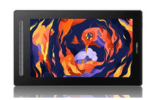
| Artist 16 2nd Gen | 16 inch | 43.4 cm | 34.10 x 19.18 cm | 60 cm plus | Daily illustration, character design, freelance creative work, home studio |
| Artist Pro 16 Gen 2 | 16 inch | 40.51 cm | 34.47 x 21.54 cm | 60 cm plus | Colour sensitive professional work, print design, branding, detailed illustration |
| Artist 22 Plus | 21.5 inch | 54.7 cm | 47.61 x 26.78 cm | 70 cm plus | Storyboarding, comic layout, video editing, dedicated studio desk |
| Artist 24 Pro | 23.8 inch | 63.2 cm | 52.69 x 29.64 cm | 75 cm plus | Production studio, large format illustration, architectural sketching, animation workflow |
4. The 13-Inch Pen Display: Portable Precision
The XPPen Artist 13 2nd Gen is the most versatile pen display in the XPPen India range in terms of use-case flexibility. At approximately 30 centimetres wide, it fits comfortably on the smallest practical work surface and can be repositioned, angled steeply for standing work, or packed into a laptop bag for travel to client meetings or co-working spaces.
Where the 13-Inch Excels
Indian freelancers who work in coffee shops, shared offices, or small apartments particularly favour the 13-inch size. When paired with a laptop and positioned between the laptop keyboard and the screen, it creates an extremely compact two-screen drawing setup. For character illustrators who work at high zoom levels on individual body parts and faces, the 13-inch screen provides all the visible working area that is actually in use at any moment.
Honest Limitations
Full-figure character illustration, comic panel layout, and storyboard work feel constrained at 13 inches because the artist must either zoom out (reducing detail visibility) or navigate frequently between sections (interrupting flow). For these use cases, the step up to 16 inches is worth the additional cost and desk space.
5. The 16-Inch Pen Display: The Professional Sweet Spot
The XPPen Artist 16 2nd Gen and Artist Pro 16 Gen 2 represent the size category that Indian professional artists most consistently choose as their primary drawing surface. At approximately 35 centimetres wide and 19 centimetres tall, the working area is approximately 50 percent larger than a 13-inch model, which is immediately perceptible when drawing full-figure characters, detailed backgrounds, or full-page editorial illustrations.
Why 16 Inches Dominates the Indian Professional Market
Indian home studios vary widely, but the standard apartment study desk or dining table repurposed for creative work typically measures 100 to 120 centimetres wide by 55 to 60 centimetres deep. A 16-inch pen display at a comfortable working angle of 20 to 25 degrees occupies approximately 36 centimetres of width and 38 centimetres of depth (including the stand footprint), leaving space on both sides for a keyboard, mouse, and writing materials. This fit is snug but practical, which is why the 16-inch category accounts for a majority of professional pen display sales in India.
Choosing Between Artist 16 2nd Gen and Artist Pro 16 Gen 2
Both share the same physical 15.4-inch panel size. The Artist 16 2nd Gen offers FHD (1920x1080) resolution and 88 percent sRGB colour coverage at a lower price. The Artist Pro 16 Gen 2 offers 2.5K QHD resolution, 2560 x 160, and 16,384 pressure levels at a significant premium. For daily illustration and design work, the Artist 16 2nd Gen is more than adequate. For print-grade colour work and maximum detail, the Pro version is the appropriate investment.
Compare the Artist 16 and Artist Pro 16 Gen 2
Both models share the professional 16-inch form factor. Explore specifications, pricing, and availability for the Indian market now.
Shop Artist Display Series6. The 22-Inch and Above: Maximum Drawing Area
Artist 22 Plus
The Artist 22 Plus delivers a 21.5-inch working surface that transforms the drawing experience for artists who produce multi-character scenes, detailed environment art, storyboard sequences, and editorial spreads. At this size, a full A3 composition can be viewed at close to actual print scale, which eliminates the mental translation between screen representation and final output that artists on smaller displays perform constantly.
The practical requirement for a 22-inch display is a dedicated studio desk at least 120 centimetres wide and 70 centimetres deep. In Indian apartment contexts, this typically means a purpose-bought standing desk, a large dining table converted for studio use, or a dedicated home office room. For artists who have that space, the improvement in compositional workflow is substantial.
Artist 24 Pro
The Artist 24 Pro at 23.8 inches is XPPen's largest pen display available in India. It is designed for production studio environments: animation studios handling broadcast television work, architectural visualisation firms, and professional illustrators producing large-format print commissions. The 92 percent Adobe RGB colour coverage makes it suitable for professional print colour workflows in addition to digital-first work.
Pen displays at 22 inches and above draw more power than a USB port can supply. They require their own power adaptor connected to a wall socket. In Indian rental apartment setups where socket placement is limited, plan your cable routing before purchasing. Running the power cable across a walkway or from a distant wall socket is a safety concern in home studio environments.
7. Desk Space Reality Check for Indian Artists
Most drawing tablet reviews are written for large desk setups in Western studios or co-working spaces. Indian home studio realities are different, and the size recommendations that follow reflect that.
Standard Indian Apartment Study Desk (80-100 cm wide, 55-60 cm deep)
A 13-inch pen display fits comfortably with a laptop alongside it. A 16-inch display fits with careful cable management and a compact keyboard. A 22-inch display does not fit comfortably on this desk size; it takes up the full width or leaves no room for a keyboard at a natural distance.
Home Office Desk (120-150 cm wide, 60-75 cm deep)
A 16-inch pen display fits with room to spare for a primary monitor, keyboard, and accessories. A 22-inch display is manageable with a good adjustable stand that positions the display correctly. A 24-inch display works if the desk is at the larger end of this range.
Dedicated Studio Desk (150+ cm wide, 75+ cm deep)
Any size pen display works on a dedicated studio desk. The 22 and 24-inch models are most effectively used on standing desks or desks with height-adjustable monitor arms, which allow repositioning the display for seated versus standing work postures.
Indian desk dimension context: Standard study desks sold by major Indian furniture retailers (Godrej Interio, Durian, Urban Ladder) typically measure 90 to 120 centimetres wide and 55 to 60 centimetres deep, according to published product specifications from these retailers. A workplace ergonomics review from the National Centre for Biotechnology Information recommends a minimum of 60 centimetres of desk depth for comfortable monitor placement, which is met by most standard Indian desks when using a 16-inch pen display at a shallow working angle.
8. How to Choose Your Screen Size
Choose 10 to 13 Inches If:
Your desk is compact (under 100 cm wide). You use the pen display as a secondary input device alongside a primary monitor. You travel frequently and need portability. You produce detailed work at high zoom levels rather than full-composition views. Budget is a significant constraint. The Artist 13 2nd Gen is the top recommendation in this tier.
Choose 15 to 16 Inches If:
You draw professionally for two or more hours daily. Your desk is a standard Indian home office size (100 to 120 cm wide, 60 cm deep). You need a balance of working area, portability, and price. You produce character illustration, concept art, or editorial illustration at full-composition scale. The Artist 16 2nd Gen or Artist Pro 16 Gen 2 are the appropriate choices.
Choose 22 Inches and Above If:
You have a dedicated studio desk of at least 120 cm wide and 70 cm deep. You produce large-scale compositions, storyboards, comic layouts, or architectural drawings. You work in a production studio or professional design environment. You want maximum working area without the cost of a second separate monitor. The Artist 22 Plus or Artist 24 Pro are the recommended choices.
9. Screen Size and Ergonomics: Posture Considerations
Pen display ergonomics become more important as screen size increases. A 13-inch display placed on a standard desk requires neck flexion of approximately 20 to 30 degrees, which is within the comfortable range for a few hours. A 22-inch display at a flat angle covers a wider visual field, requiring more eye and neck movement to view the full panel without turning the head.
Optimal Working Angle by Size
For 10 to 13-inch displays, a working angle of 25 to 45 degrees from horizontal is comfortable. For 16-inch displays, 15 to 30 degrees is recommended. For 22-inch and above, 10 to 20 degrees is preferable to keep the full panel within comfortable eye range without requiring excessive neck flexion. All XPPen pen displays ship with an adjustable stand; the AC42 adjustable stand and AC-18 metal stand provide precise angle control for any size display.
Wrist Position Relative to Screen Edges
When drawing on the edges of a large pen display, the wrist naturally extends or flexes to reach corners. For 22-inch and above models, ensure your chair height and table height allow you to draw at the far corners of the screen without straining. An adjustable desk chair and a display positioned at or slightly below elbow height minimises this strain.
10. Who Uses Each Screen Size in India?
- Screen size selection should match your desk dimensions, daily drawing duration, and primary creative use case rather than the largest size your budget allows.
- For most Indian home studios with standard apartment desks, 16 inches is the most practical professional size.
- 13-inch displays are ideal for portable use, compact desks, and artists who use a pen display as a secondary input device alongside a primary monitor.
- 22-inch and larger displays require dedicated studio desks of at least 120 cm wide and 70 cm deep, plus a separate power connection.
- Larger displays improve compositional workflow for full-figure and multi-element illustrations by reducing zoom-and-navigate frequency.
- Screen size does not affect pen tracking accuracy; that is determined by EMR technology and stylus quality, both of which are consistent across the XPPen Artist range.
11. Related Reading
12. Frequently Asked Questions
What pen display screen size is best for a home studio in India?
For most Indian home studios with standard apartment desks, a 16-inch pen display strikes the best balance between drawing area and footprint. The XPPen Artist 16 2nd Gen is the most popular choice in this size category among Indian professionals. It provides a significantly larger working surface than a 13-inch model without requiring the dedicated deep desk space that a 22-inch or larger display demands.
Is a 13-inch pen display too small for professional illustration work in India?
Not necessarily. Many professional Indian illustrators produce commercial-quality work on 13-inch displays. The Artist 13 2nd Gen is limiting for storyboarding, comic panel layout, and architectural sketching, where spatial context across the full composition matters. For detailed character art worked at high zoom levels, 13 inches is fully capable.
Does a larger pen display improve drawing accuracy?
A larger pen display does not inherently improve hardware drawing accuracy, since pen tracking quality depends on the EMR technology and stylus, not the screen size. However, a larger display reduces the mapping ratio between hand movement and canvas coverage, which can make very fine detail work feel more controlled at the same zoom level.
How much desk space does a 22-inch pen display require in India?
A 22-inch pen display requires approximately 65 to 75 centimetres of total desk depth. Most standard Indian apartment desks are 60 centimetres deep, making the Artist 22 Plus a tight fit without a dedicated larger studio desk. Plan your desk space before purchasing this size.
Can I use a 16-inch pen display without a separate monitor in India?
Yes. A 16-inch pen display can serve as your sole display when connected to a desktop computer. However, the matte anti-glare surface and drawing-optimised colour profile are less comfortable for extended text reading. For a mixed workflow combining drawing with document work, a second monitor alongside the pen display is recommended.
What is the physical size difference between a 13-inch and 16-inch pen display?
A 13-inch display at 16:9 measures approximately 29 cm wide and 16 cm tall. A 16-inch display at 16:9 measures approximately 35 cm wide and 20 cm tall. The working area of the 16-inch display is approximately 50 percent larger, which is a meaningful difference during full-composition illustration work.
Should I buy a larger pen display if I also use it for video editing in India?
Yes. Video editing workflows benefit significantly from a larger screen. The XPPen Artist 22 Plus is specifically recommended for mixed drawing and video editing workflows in India, providing enough space for a colour grading application alongside a reference window.


