






Graphic Tablet for Architecture and Interior Design India
- Graphic tablets benefit Indian architects and interior designers most in the hand-sketching, concept development, and design presentation phases of the workflow.
- AutoCAD's technical drafting functions are primarily mouse-and-keyboard based, but the Sketch command and plan annotation tasks benefit from stylus precision.
- SketchUp, Rhino, and Lumion all support pen tablet input; the stylus is particularly useful for freehand geometry placement and perspective sketching over model views.
- The digital tracing-paper workflow (sketching on a layer over a CAD plan background) is the most immediately useful application of a tablet for Indian architecture students and professionals.
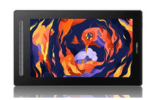
- The XPPen Deco 01 V3 is the recommended tablet for most Indian architects; the Artist 13 2nd Gen pen display is the preferred option for interior designers working on client presentations.
- Architecture students in India benefit significantly from a tablet for design studio critiques, digital section collages, and presentation drawings.
- How the Architecture Workflow Uses Drawing Tablets
- Graphic Tablets in AutoCAD and Revit
- Tablet Comparison for Architects and Interior Designers
- The Digital Tracing Paper Workflow
- SketchUp, Rhino, and 3D Visualisation
- Interior Design: Mood Boards and Client Presentations
- Common Mistakes Architects Make When Using Tablets
- Setup and Configuration for Architecture Software
- How Architecture Students in India Use Graphic Tablets
- Who Uses Graphic Tablets in India's Design Industry?
- Related Reading
- Frequently Asked Questions
The question of whether a graphic tablet is worth investing in for Indian architects and interior designers is one that surfaces regularly in NID, SPA, and CEPT student communities, and among practising professionals looking to improve their digital workflow. The honest answer is nuanced: a tablet does not replace the precision mouse-and-keyboard workflow of technical CAD drafting, but it significantly enhances the hand-drawing, concept exploration, and presentation design phases that define the quality of an architect's output as much as the technical drawings do. Browse the XPPen digital designing collection to see the tablets most used by Indian design professionals before reading this workflow guide.
This guide is written for Indian architecture students, practising architects, and interior designers who want to understand where a graphic tablet adds genuine value to their workflow and which model provides the best return on investment. The XPPen India team has engaged with design schools and architecture practices across the country, and the observations in this guide reflect the specific workflows used in Indian design education and practice.
Last reviewed: May 2026
1. How the Architecture Workflow Uses Drawing Tablets
An architectural project moves through several distinct phases, each with different drawing requirements. The pre-design and concept phase involves gestural hand sketching: rough plans, section ideas, massing studies, and perspective explorations. The design development phase refines these ideas using CAD software. The presentation phase translates technical drawings into visual communication tools for clients: rendered plans, section collages, perspective views, and mood boards.
Drawing tablets are most valuable in the first and third phases. In the concept phase, a tablet replaces the physical sketchbook for designers who prefer to sketch digitally or need to share sketches quickly via email or Teams. In the presentation phase, a tablet provides the precision needed to render plans in Photoshop, create hand-drawn-style illustration overlays, and annotate drawing sets for client review.
Industry context: India's construction and real estate sector is one of the largest in the world. According to IBEF's construction sector analysis, India's real estate market was projected to reach USD 1 trillion by 2030, driving sustained demand for design professionals and the digital tools they use. Architecture students graduating from India's design schools in 2026 enter a market where digital drawing capability is a standard professional expectation.
2. Graphic Tablets in AutoCAD and Revit
AutoCAD and Revit are the dominant CAD platforms in Indian architecture practices. Both support pen tablet input through the standard XPPen driver, but their primary workflows are designed around mouse and keyboard input. Understanding where a tablet adds value in these applications prevents disappointment from expecting the tablet to replace the mouse for all tasks.
AutoCAD Sketch Command
AutoCAD's Sketch command allows freehand drawing directly in the model space, with the pen tablet stylus controlling the freehand trace. This is useful for importing hand-drawn sketches directly into a CAD drawing as reference geometry, or for adding freehand annotation to construction documents in a markup workflow. Assign the Sketch command to an express key for quick access during design review sessions.
Plan Annotation and Markup
Annotating PDF exports of CAD drawings for client review is one of the most practical tablet applications for Indian architects. Open the PDF in Adobe Acrobat or Bluebeam, use the stylus to draw freehand markup notes directly on the drawing, and return the annotated file to the client. This is faster and more communicative than typing comment boxes.
Revit and BIM Workflows
In Revit, the tablet functions as a precision pointer for element placement and view navigation. The stylus does not offer meaningful advantages over a mouse for the parametric modelling tasks that define Revit's workflow. However, for annotating Revit sheet views in PDF exports and for freehand sketching in linked Photoshop files used for presentation sheets, the tablet is a useful addition to the Revit workflow.
AutoCAD on Windows requires the XPPen driver with Windows Ink enabled for the stylus to function as a precision pointer in the drawing canvas. Without Windows Ink, AutoCAD may interpret stylus input incorrectly or produce erratic cursor behaviour. Enable Windows Ink in the driver's pen settings tab before opening AutoCAD for the first time.
3. Tablet Comparison for Architects and Interior Designers
| Model | Active Area | Type | Express Keys | Best Architecture Use Case | Current Listed Price |
| Deco Mini 7 V2 | 7 x 4.37 inch | Pen tablet | 8 keys | Concept sketching, student work, basic plan marking, diagram notes | Rs 3,399 |
| Deco 01 V3 | 10 x 6.25 inch | Pen tablet | 8 keys | Full architecture workflow, presentation drawings, plan annotation, Photoshop rendering | Rs 6,299 |
| Deco Pro S / M | S: 9 x 5 inch, M: 11 x 6 inch | Pen tablet | 8 keys plus double wheel | Presentation rendering, Photoshop plan visualisation, CAD markup, brush and zoom control | From Rs 7,299, M currently Rs 10,299 |
| Artist 13 2nd Gen | 13.3 inch display, 293.76 x 165.24 mm work area | Pen display | 9 keys | Interior design client presentations, mood boards, sketch overlays, compact display workflow | Rs 27,499 |
| Artist 16 2nd Gen | 15.4 inch display, 340.99 x 191.81 mm work area | Pen display | 10 keys | Large scale section collages, site planning visualisation, design presentation work | Rs 33,499 |
4. The Digital Tracing Paper Workflow
The single most immediately useful tablet application for Indian architects is the digital tracing paper workflow. This replicates the physical process of placing a sheet of tracing paper over a printed plan and sketching design ideas on top of it, but entirely in Photoshop or Krita with layers.
How to Set Up the Digital Tracing Workflow
Export your AutoCAD floor plan as a PDF or high-resolution image. Import it into Photoshop as the background layer. Reduce the plan layer's opacity to 40 to 50 percent. Create a new layer above it. Set the layer blending mode to Multiply. Now sketch design ideas, furniture arrangements, or landscape elements on the new layer using the XPPen stylus. The plan is visible beneath the sketch as a proportional reference, exactly as physical tracing paper works.
Multiple Design Iterations
Create a new layer for each design iteration. Toggle layers on and off to compare different approaches. This non-destructive layer workflow allows you to show clients multiple options in the same file and switch between them during a live presentation meeting. The equivalent physical process (redrawing on a fresh tracing paper for each iteration) takes significantly longer and produces materials that are harder to share electronically.
5. SketchUp, Rhino, and 3D Visualisation
SketchUp is the dominant 3D modelling tool in Indian architecture schools and small to medium design practices. Its intuitive push-pull interface works well with both mouse and stylus input. For modelling tasks that require precise edge placement, the stylus offers slightly better control than a mouse due to the natural pen grip, which allows more stable hand position than a mouse grip.
SketchUp Freehand Tool
SketchUp's Freehand tool creates curved spline geometry by tracing stylus movement across the model view. This is useful for creating organic landscape elements, curved site boundaries, and flowing furniture forms. The pressure sensitivity allows variable-weight freehand lines in SketchUp Layout for section and elevation annotation drawings.
Rhino and Grasshopper
Rhino is used by a growing number of Indian architecture graduates working in parametric and computational design. The tablet stylus functions as a precision pointer in Rhino's viewport, and the tilt recognition of models like the Deco Mini 7 supports the directional brushstroke tools in Rhino's rendering plugin environments. For Grasshopper script development, the tablet is used primarily as a precision pointer rather than a drawing device.
Lumion and Enscape
Real-time rendering tools like Lumion and Enscape are used extensively in Indian architecture presentations. In Lumion's photo editing mode, the tablet stylus allows precise placement of effects brushes for rain, fog, and atmosphere overlays. For post-processing rendered images in Photoshop, the same retouching benefits discussed in the photo editing workflow apply directly to architectural render compositing.
Equip Your Architecture Practice with XPPen India
From the affordable Deco 01 V3 for students to the large-format Artist 16 for studio presentations, XPPen India offers tablets for every architectural workflow stage.
Shop Design Professional Tablets6. Interior Design: Mood Boards and Client Presentations
Interior designers in India typically produce more visual, hand-drawn-feel presentation material than architects. Client mood boards, material selection layouts, and perspective hand sketches of interior spaces are the deliverables that define the client relationship and win commissions. A graphic tablet is the tool that allows interior designers to produce these materials at professional quality without outsourcing the illustration work to a separate renderer.
Mood Board Creation in Photoshop
Assemble reference images, material swatches, and colour palettes on a Photoshop canvas. Use the stylus to add hand-drawn annotations, arrows, and sketch overlays that visually connect the reference materials to specific design decisions. The hand-drawn quality of these annotations adds a personal, crafted quality to presentations that typeset text cannot replicate, which is a competitive differentiator for Indian interior designers presenting to discerning clients.
Space Planning Sketches
For interior designers, the Artist 13 2nd Gen pen display is particularly effective for space planning work because drawing directly on the screen provides the spatial intuition needed to assess furniture scale and circulation paths. Working on a floor plan background layer in the same digital tracing paper approach described in Section 4 allows rapid iteration of furniture arrangements and spatial configurations.
7. Common Mistakes Architects Make When Using Tablets
Expecting the Tablet to Replace CAD Input
The most frequent disappointment among Indian architects who buy a tablet is expecting it to replace mouse-based CAD input entirely. Technical line work in AutoCAD and Revit is faster and more accurate with a mouse and keyboard. The tablet's value is in the freehand, illustrative, and presentation layers of the workflow, not in the technical drafting layer.
Using Too Small an Active Area for Plan-Scale Work
An A0 floor plan displayed at its typical zoom level on a large monitor requires a relatively large arm gesture to traverse from one end to the other. A 4x3-inch tablet feels restrictive for this scale of work. For architectural plan sketching, a minimum 10x6-inch active area is recommended. The Deco 01 V3 is the practical minimum for comfortable architectural sketching.
Skipping the Digital Tracing Paper Setup
Architects who open a blank Krita canvas and attempt to sketch without a CAD reference background miss the most powerful application of the tablet in their workflow. Setting up the digital tracing paper layer structure (described in Section 4) takes five minutes and transforms the sketching experience from free-floating to spatially grounded.
8. Setup and Configuration for Architecture Software
Express Key Configuration for AutoCAD
In the XPPen driver, create an AutoCAD-specific application profile. Assign the following express keys: Escape (cancel command), Enter (confirm command), U (undo last point in polyline), Zoom Extents (type ZE as a macro if supported), and Pan (spacebar in AutoCAD). These five shortcuts cover the majority of navigation and editing actions during a plan sketching or annotation session in AutoCAD.
Pressure Curve for Architectural Sketching
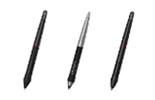
Architectural hand sketching typically uses a firmer line quality than fine illustration. Set the pressure curve to a slightly firm profile (drag the midpoint slightly upward) to make it easier to produce consistent, confident lines with moderate pressure. This prevents the thin, tentative lines that result from a too-soft pressure curve during concept sketching.
In Photoshop, use a hard-edged brush (0 percent softness) for clean architectural line work overlays, and a soft-edged brush (50 to 70 percent softness) for rendering shadow gradients on elevation drawings. Assign these two brushes to the pen's two side buttons in the XPPen driver so you can switch between them without lifting the pen or reaching for the keyboard.
9. How Architecture Students in India Use Graphic Tablets
Architecture students at NID, SPA Delhi, CEPT Ahmedabad, and design schools across India use graphic tablets primarily for three purposes: design studio presentation drawings, digital section collages, and concept sketching during the design development phase.
Design Studio Presentation Drawings
Studio crits in Indian architecture schools traditionally evaluate both technical and representational quality. A hand-rendered plan or elevation produced with a graphic tablet, with properly weighted lines, shadow hatching, and figure-ground relationships, demonstrates drawing skill equivalent to a physical hand drawing while being faster to produce and easier to revise. Students who develop this skill early have a consistent advantage in studio presentations.
Section Collages and Exploded Axonometrics
Section collages (architectural sections populated with human figures, furniture, and atmospheric rendering) are a staple of Indian architecture school presentations. These are produced in Photoshop by compositing CAD-exported line drawings with photographic textures and hand-drawn elements. The graphic tablet is used for the hand-drawn components: shadow rendering, figure sketching, and freehand texture overlays that give section collages their characteristic character.
Education adoption: According to a survey of architecture students published by the Council of Architecture India in its digital education resources, digital hand drawing tools including graphic tablets are now used by over 60 percent of final-year architecture students at accredited institutions in India, reflecting the broad adoption of digital drawing tools in design education across the country.
10. Who Uses Graphic Tablets in India's Design Industry?
- Graphic tablets add genuine value to the concept sketching and presentation design phases of architectural workflow; technical CAD drafting remains primarily mouse-and-keyboard based.
- The digital tracing paper workflow (sketching on a layer over a CAD plan background in Photoshop) is the most immediately practical tablet application for Indian architects.
- The Deco 01 V3 is the recommended tablet for most Indian architects; the Artist 13 2nd Gen pen display is preferred by interior designers for client presentation work.
- Architecture students use tablets for section collages, studio presentation hand-rendering, and concept sketching, gaining a competitive advantage in design critiques.
- Enable Windows Ink in the XPPen driver before using AutoCAD on Windows for reliable stylus input behaviour in the CAD canvas.
- Over 60 percent of final-year architecture students at accredited Indian institutions now use digital drawing tools including graphic tablets.
11. Related Reading
12. Frequently Asked Questions
Is a graphic tablet useful for AutoCAD work in India?
A graphic tablet improves precision for the Sketch command, freehand annotation over plans, and client markup workflows in AutoCAD. Most technical CAD drafting remains more efficient with mouse and keyboard. The clearest benefit is in the freehand and annotation layers of AutoCAD work. Enable Windows Ink in the XPPen driver before using AutoCAD on Windows for reliable stylus input.
Which graphic tablet is best for architects in India?
The XPPen Deco 01 V3 is the most practical choice for Indian architects who blend CAD work with hand sketching and concept design. Its large active area and eight configurable express keys cover all sketch and presentation workflow needs. For architects who produce high-volume presentation renders, the Deco Pro Small with its dial is the upgrade option.
Can I use a drawing tablet for SketchUp in India?
Yes. SketchUp supports pen tablet input through the standard driver. The stylus functions as a precision pointer for edge and face placement. SketchUp's Freehand tool responds to stylus movement for creating organic curves and site boundaries. For interior designers, a tablet is also useful for annotating SketchUp Layout sheets and PDF exports of floor plans and elevations.
Do architecture students in India benefit from a graphic tablet?
Yes, significantly. Architecture students use tablets for digital section collages, studio presentation hand-rendering, and concept sketching. Students who develop digital hand-drawing skill with a tablet have a consistent advantage in design critiques and portfolio presentations. The Deco Mini 7 is a practical entry point for Indian architecture students.
What is the best drawing tablet for interior designers in India?
For interior designers in India who produce mood boards, space planning sketches, and client proposals, the XPPen Artist 13 2nd Gen pen display is a strong choice. For a pen tablet option, the Deco 01 V3 covers all interior design digital workflow needs at a lower price.
Can a graphic tablet replace a physical drawing board for architects in India?
A graphic tablet replaces the hand-drawing component of architectural workflow: concept sketching, design development overlays, and freehand perspective exploration. It does not replace precision CAD drafting functions. Most Indian architects and students use both: CAD for technical drawings and a tablet for the hand-drawing phases of design that require gestural exploration.
How do I use a pen tablet for architectural hand sketching in India?
Open Photoshop or Krita, import your CAD floor plan as a background layer, reduce its opacity to 50 percent, and create a new layer above it. Use the pen tablet stylus to sketch design ideas on the new layer, exactly as you would with pencil on tracing paper over a CAD print. Save each iteration as a separate layer. See our guide on the complete digital art workflow for more layer technique tips.


