






Pen Tablet vs Pen Display: Which to Buy in India
Key Highlights
✅ A pen tablet, also called a screenless tablet, costs much less than an equivalent pen display, making it the default choice for many Indian buyers on a budget.
✅ Pen displays provide direct screen drawing that feels closer to traditional media, reducing the hand and eye coordination learning curve.
✅ Pen tablets are lighter, generate less heat, and are easier on the neck and shoulders during long creative sessions.
✅ Both types use EMR stylus technology and can offer high pressure sensitivity, including 16,384 pressure levels on selected newer XPPEN models.
✅ Professional studios in India often use pen tablets for production work and pen displays for client facing and concept design stages.
✅ The right choice depends on your budget, desk space, primary use case, and whether you are transitioning from traditional art.
In This Article
✅ Defining the Two Device Types
✅ How the Technology Differs Under the Hood
✅ Side by Side Specification Comparison
✅ Price Differences in the Indian Market
✅ Ergonomics and Long Session Comfort
✅ Which Device Suits Your Use Case?
✅ Common Misconceptions About Each Type
✅ Setup and Desk Space Requirements
✅ Professional Perspectives from Indian Artists
✅ Who Should Buy Which Device?
✅ Related Reading
✅ Frequently Asked Questions
The pen tablet versus pen display debate is the first major decision every new digital artist in India faces, and it is one that experienced professionals revisit whenever they upgrade their setup. The terminology alone causes confusion. Both are sometimes called drawing tablets, both use a pressure sensitive stylus, and both connect to a computer. The difference is a screen, and that single feature changes the price, ergonomics, learning curve, and ideal use cases significantly.
Browse XPPEN pen tablets and XPPEN pen displays to see both categories side by side before reading further.
This guide is built around observations from the Indian creative community, testing conducted on XPPEN hardware across both categories, and a structured analysis of which device type delivers the best outcome at each price point available in India. The XPPEN India team has worked with artists, educators, and animation studios across the country, and those conversations inform every recommendation here.
Written by Nishit Shah, Country Manager.
Last reviewed: May 2026
1. Defining the Two Device Types
What Is a Pen Tablet?
A pen tablet, also called a screenless tablet or blind tablet, is a flat input device with an electromagnetic drawing surface. You hold a battery free stylus and draw on the surface while watching your computer monitor, which displays the results of your input. The tablet itself shows nothing. It is simply a precision sensor that captures pen position, pressure, and tilt and sends that data to the computer.
XPPEN Deco series and XPPEN Star series represent the pen tablet category. Models range from compact travel ready surfaces to larger professional tablets in the Deco Pro range.
For example, the XPPEN Deco Mini 7 V2 is a compact pen tablet that weighs around 307 g, making it easy to carry and use in smaller workspaces.
What Is a Pen Display?
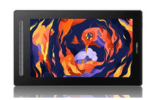
A pen display integrates a colour LCD or OLED screen into the drawing surface. When you draw on it, you draw directly on the image you are creating, as though drawing on paper. The display shows the canvas in real time. Pen displays connect to a computer as an additional monitor and require a compatible cable, typically USB C or HDMI plus USB.
XPPEN Artist Display Series represents this category in India, from compact models to larger professional displays like the Artist 24 Pro and Artist Pro 24 Gen 2 4K.
2. How the Technology Differs Under the Hood
Both device types use electromagnetic resonance technology for pen tracking. The stylus contains a resonant circuit that responds to a scanning signal from the tablet’s coil grid. Position, pressure level, and tilt angle are all derived from this electromagnetic interaction. The underlying pen tracking is therefore similar between a pen tablet and a pen display of the same generation.
What differs is the display layer. A pen display adds an IPS LCD or OLED panel, a backlight, colour calibration hardware, and additional signal processing circuitry. The pen still communicates through EMR, but now it must do so through the glass and display layers of the screen. This can introduce a small degree of parallax between the visible pen tip and the cursor position on screen. Premium fully laminated pen displays minimise this gap by bonding the glass directly to the panel.
Note
Pen tablets can deliver excellent pen input quality at a fraction of the cost because they omit the display assembly entirely. If your goal is maximum pressure accuracy per rupee spent, a pen tablet remains one of the strongest choices.
Also Read: Drawing Tablets vs Graphics Tablets: What Is the Actual Difference?
3. Side by Side Specification Comparison
| Feature | Pen Tablet Screenless | Pen Display With Screen |
|---|---|---|
| Built in display | No | Yes, IPS LCD or OLED depending on model |
| Price range in India | Around Rs 2,000 to Rs 10,000 plus for most regular models | Around Rs 29,999 to Rs 92,999 plus depending on model and size |
| Pressure sensitivity | 8,192 or 16,384 pressure levels depending on model | 8,192 or 16,384 pressure levels depending on model |
| Power consumption | Very low, usually USB powered | Moderate to high because of the display and backlight |
| Ergonomic posture | Tablet flat, eyes on monitor | Angled screen, neck bending possible |
| Learning curve | Hand and eye coordination required | More intuitive for paper artists |
| Parallax | None, because there is no screen layer | Minimal on laminated models, more visible on non laminated models |
| Portability | Excellent, lightweight and easy to carry | Moderate, requires more space and cables |
| Best for | All day production work, photo editing, teaching | Concept art, character design, client demos |
Also Read: Pen Tablet or Display Tablet: A Detailed Decision Guide
4. Price Differences in the Indian Market
The price gap between equivalent pen tablets and pen displays is the dominant factor for most Indian buyers. Current XPPEN pen tablet pricing in India starts from entry level models and goes up to professional Deco Pro models. Popular models such as the XPPEN Deco 01 V3 offer a large drawing area and 16,384 pressure levels at a much lower price than most pen displays.
A pen display costs more because it includes an actual screen, display panel, colour hardware, lamination, backlight, and more complex connectivity. Current XPPEN pen displays in India include models such as the Artist 15.6 Pro V2, Artist Pro 16 Gen 2, Artist 24 Pro, Artist Pro 24 Gen 2 4K, and Artist Ultra 16.
Where the Extra Cost Goes
✅ IPS LCD or OLED display panel
✅ Backlight assembly
✅ Colour calibration hardware
✅ Full lamination on selected models
✅ Anti glare display surface on selected models
✅ More complex cable and display connectivity
✅ Screen based workflow for direct drawing
These components are expensive to manufacture and contribute genuine value. A well calibrated pen display with accurate colour and a laminated surface is a real professional tool.
Budget Allocation Insight
A student who spends around Rs 6,000 on an XPPEN Deco 01 V3 can still keep part of their budget for software subscriptions, online courses, accessories, or learning resources. In many cases, the additional learning investment returns more creative growth than spending the entire budget on an entry pen display.
5. Ergonomics and Long Session Comfort
This is where pen tablets hold a frequently overlooked advantage. When you work on a pen display, you lean forward and look down at an angled screen. Over long sessions, this posture can strain the neck, upper back, and shoulders.
A pen tablet sits flat on the desk. Your eyes remain on your monitor at a natural eye level. Your shoulders stay back. For professionals who draw for six to eight hours a day, this ergonomic difference can become important over time.
Managing Pen Display Ergonomics
✅ Use a quality adjustable stand.
✅ Keep the display at a comfortable drawing angle.
✅ Avoid leaning too far forward while drawing.
✅ Use a drawing glove to reduce palm friction.
✅ Take short breaks during long creative sessions.
Pro Tip
Position a pen display at an angle between 20 and 35 degrees from horizontal. Angles that are too steep can increase wrist and shoulder strain, while angles that are too flat may create glare in typical Indian office lighting conditions.
Explore XPPEN pen displays for Indian artists. From compact displays to large format professional screens, XPPEN offers pen displays for students, illustrators, animators, designers, and studio professionals.
6. Which Device Suits Your Use Case?
Choose a Pen Tablet If:
✅ You are a student or budget conscious creative.
✅ You primarily do photo retouching in Lightroom or Photoshop.
✅ You teach online and annotate slides or whiteboards.
✅ You are an animator working frame by frame in a production pipeline.
✅ You already work comfortably with a mouse and are learning digital art.
✅ You travel frequently and need a portable setup.
✅ You want a lightweight device that takes up less desk space.
Choose a Pen Display If:
✅ You are transitioning directly from traditional drawing or painting.
✅ You find the hand and eye disconnect of a pen tablet frustrating.
✅ You do client facing design work and want to demonstrate changes directly on the drawing surface.
✅ You produce detailed character illustration or portrait work where direct visual control helps.
✅ You have the desk space and budget to accommodate a second screen sized device.
Also Read: What Are Standalone Drawing Tablets? A Guide for Indian Buyers
7. Common Misconceptions About Each Type
Misconception 1: Pen Displays Are Always More Accurate
This is not true. Both categories use EMR based pen technology. A pen tablet can feel extremely accurate because it has no glass layer between the pen surface and the tracking area. The misconception arises because drawing directly on screen feels more intuitive, which is often interpreted as more accurate. Intuition and accuracy are not the same thing.
Misconception 2: Pen Tablets Are Only for Beginners
Many experienced digital artists work exclusively on pen tablets. Character designers, concept artists, illustrators, editors, and online educators use pen tablets for serious production work. The pen tablet is a professional tool, not just a starter tool.
Misconception 3: You Need a Pen Display to Do Professional Work
Professional quality digital art is produced on pen tablets every day in studios and freelance workflows. The tool does not define the professional output. Skill, software, consistency, and workflow matter more. A pen display adds convenience for certain tasks, but it is not a requirement for professional results.
8. Setup and Desk Space Requirements
A pen tablet requires only a USB cable or wireless connection depending on the model, and only a small amount of desk space. Setup is usually simple and quick.
A pen display requires more planning. It needs a display connection, a data connection, and sometimes a power connection depending on the model. It also needs enough desk space to position it comfortably alongside your main monitor or laptop. You may also need time for display settings and colour adjustments.
Cable Management Considerations
✅ Pen tablets usually need less desk space.
✅ Pen tablets are easier to move between home, office, college, and studio setups.
✅ Pen displays need more room because they work like an additional screen.
✅ Larger pen displays may need more cable planning.
✅ If your workspace is compact, a pen tablet can feel cleaner and easier to manage.
9. Professional Perspectives from Indian Artists
Across the Indian creative industry, the split between pen tablet and pen display users reflects workflow preferences rather than skill level. Animation studios working on production pipelines often use pen tablets for frame by frame work because the flat surface allows faster, more rhythmic hand movement.
Character designers and background artists may prefer pen displays for detailed concept passes, especially when they want a more natural paper like drawing experience.
Freelance illustrators often prefer pen tablets for editorial work, retouching, teaching, and infographics where speed matters. Pen displays are often preferred for children’s book illustration, detailed portraits, and client facing creative work where drawing directly on the artwork feels more natural.
10. Who Should Buy Which Device?
Pen Tablet Recommended Segments
✅ Online teachers and educators
✅ Animators and frame by frame artists
✅ Photo editors and retouchers
✅ Students and beginners under budget
✅ Frequent travellers
✅ Users with compact workspaces
Pen Display Recommended Segments
✅ Character designers and illustrators
✅ UI and graphic designers needing direct visual control
✅ Traditional artists transitioning to digital
✅ Professionals who prefer screen based drawing
✅ Artists working on detailed concept art and client demos
Either Works Well For
✅ General digital illustration
✅ Clip Studio Paint and Krita artists
✅ Photoshop and Illustrator workflows
✅ Artists looking for 16,384 pressure sensitivity, depending on the selected model
Key Takeaways
✅ Pen tablets cost significantly less than pen displays at equivalent specification levels, making them a strong choice for budget conscious Indian buyers.
✅ Both device types can offer excellent pen performance, and selected newer XPPEN models support 16,384 pressure levels.
✅ Pen tablets are more ergonomic for long daily sessions, while pen displays benefit from an adjustable stand to reduce neck strain.
✅ Traditional artists transitioning to digital often adapt faster on a pen display, while production professionals may prefer the speed and posture of a flat pen tablet.
✅ Neither device is objectively superior for producing professional quality digital art. Workflow preference, budget, desk space, and comfort are the deciding factors.
11. Related Reading
Articles and Guides
✅ Pen Tablet or Display Tablet: Full Decision Guide
✅ Benefits of Using a Display Tablet for Digital Art
✅ What Are Standalone Drawing Tablets?
✅ Are Digital Drawing Tablets Difficult to Use?
Products to Compare
✅ XPPEN Deco 01 V3
✅ XPPEN Artist 13 2nd Gen
✅ XPPEN Deco Pro Series
✅ XPPEN Artist Pro 16 Gen 2
✅ XPPEN Artist 24 Pro
✅ XPPEN Artist Pro 24 Gen 2 4K
Collections
✅ All Pen Tablets
✅ All Pen Displays
✅ New Launches
Company Pages
✅ About XPPEN India
✅ Product FAQ
✅ Driver Downloads and Support
Frequently Asked Questions
1. Is a pen tablet better than a pen display?
Neither is automatically better. A pen tablet is usually better for budget, portability, desk space, and long working sessions. A pen display is better if you want to draw directly on screen and prefer a workflow that feels closer to traditional drawing.
2. Do pen tablets and pen displays have the same pressure sensitivity?
Yes, both categories can offer similar pressure sensitivity depending on the selected model. Selected newer XPPEN models support up to 16,384 pressure levels.
3. Which is better for beginners?
A pen tablet is usually better for beginners on a budget because it gives strong value at a lower price. A pen display can be easier for beginners who are coming from sketchbooks, canvas, or traditional drawing.
4. Which is better for professional artists?
Both can be used professionally. Many production artists prefer pen tablets for speed and posture, while illustrators and concept artists may prefer pen displays for direct visual control.
5. Which XPPEN model should I start with?
If you want a pen tablet, the XPPEN Deco 01 V3 is a strong starting option. If you want a pen display, you can explore the XPPEN pen display collection and choose based on screen size, budget, and workflow.


