





4K OLED vs IPS Drawing Tablets: Which Screen Is Better India
Key Highlights
OLED pen displays deliver true black, very high contrast and richer colour depth than IPS, but they come at a higher price and require more careful usage because of possible burn in risk during static heavy drawing workflows.
IPS panels are more consistent in brightness, have no burn in risk and offer strong practical reliability for artists who draw for long daily sessions.
4K resolution on a 15.6 inch display produces very sharp line art and detailed visuals, especially when working on high resolution illustration, animation, design and colour focused projects.
Colour gamut, including sRGB, Adobe RGB and Display P3 coverage, is one of the most important specifications for professional print, design, illustration and video workflows.
OLED burn in can be a concern for drawing displays because static UI elements like toolbars, layer panels and colour pickers often remain on screen for long periods.
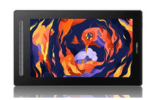
The XPPEN Artist Ultra 16 4K OLED is the premium OLED option for creators who want a 15.6 inch 4K OLED display, 16,384 pressure levels and wide colour coverage.
The XPPEN Artist Pro 16 (Gen 2) is a strong IPS option with a 16 inch 2.5K QHD display, 16,384 pressure levels and excellent colour coverage for professional artists.
In This Article
- Understanding Display Technologies in Pen Displays
- How IPS LCD Panels Work in Drawing Tablets
- How OLED Panels Work in Drawing Tablets
- Head to Head Comparison: IPS vs OLED for Artists
- The 4K Resolution Factor
- Colour Gamut: sRGB vs Adobe RGB Explained
- OLED Burn In: The Real Risk for Drawing Workflows
- How to Choose the Right Display Technology for Your Work
- Calibrating for Accurate Colour Regardless of Panel Type
- Who Needs Which Display Technology in India?
- Related Reading
- Frequently Asked Questions
The debate between 4K OLED and IPS LCD for drawing tablets is one of the most important buying decisions a professional Indian artist can face in 2026. OLED panels deliver visual quality that IPS cannot fully match in certain areas, especially contrast, true black and colour richness. IPS panels, on the other hand, offer consistency, longevity and zero burn in risk, making them more practical for many daily professional drawing workflows.
Understanding which display technology suits your specific use case is what separates an informed purchase from an expensive mistake.
Browse the XPPEN display tablet collection to see the current range before diving into the technical comparison below.
This guide draws on display technology standards used by the creative industry and practical observations from artists in Indian studios using different display types. The XPPEN India team supports professional artists and studios across animation, illustration and design, and the guidance here reflects the real world considerations that matter most in Indian creative environments.
Written by Nishit Shah, Country Manager.
Last reviewed: May 2026
1. Understanding Display Technologies in Pen Displays
A pen display’s screen is responsible for the visual accuracy of everything you create. Two major display technologies are commonly discussed in the professional pen display market:
IPS LCD, which stands for In Plane Switching Liquid Crystal Display
OLED, which stands for Organic Light Emitting Diode
Both technologies can produce excellent results, but they work differently and suit different creative needs.
The choice is not simply about which screen looks better at first glance. It is about which panel technology stays accurate, comfortable and reliable across the specific conditions of daily professional drawing. In India, that often means long working sessions, bright rooms, variable ambient lighting and the expectation that hardware should last for years.
2. How IPS LCD Panels Work in Drawing Tablets
IPS LCD panels use a backlight that illuminates the screen. Liquid crystals control how much of that light passes through each pixel, while colour filters produce the final image.
IPS is widely used in professional creative displays because it offers:
✅ Consistent colour across the screen
✅ Wide viewing angles
✅ Good brightness uniformity
✅ Reliable long term performance
✅ No burn in risk
✅ Stable colour for daily work
For artists, this means an IPS pen display is usually a safe and practical option for long hours of drawing, design, retouching, animation and editing.
Strengths of IPS for Drawing Tablets
IPS panels are especially useful when you need reliable colour and consistent brightness across the full screen. This matters when working on:
✅ Illustration
✅ Character design
✅ Animation
✅ Digital painting
✅ UI design
✅ Graphic design
✅ Photo editing
✅ Print focused artwork
IPS panels also have no burn in risk, which is important because drawing software often keeps the same interface elements on screen for hours.
Limitations of IPS
Because IPS panels use a backlight, they cannot produce true black. Black areas may look slightly grey compared to OLED. Contrast is also lower than OLED, so dark scenes, night environments or cinematic artwork may not look as deep as they would on an OLED display.
Even then, IPS remains a practical choice for most professional artists because of its reliability and colour stability.
3. How OLED Panels Work in Drawing Tablets
OLED panels work differently from IPS. In an OLED screen, each pixel produces its own light. When a pixel needs to show black, it can turn off completely.
This allows OLED displays to produce:
✅ True black
✅ Very high contrast
✅ Richer dark tones
✅ More vibrant colours
✅ Faster pixel response
✅ A more premium viewing experience
For artists who create atmospheric artwork, dark fantasy scenes, cinematic illustrations or high contrast visuals, OLED can look immediately impressive.
Strengths of OLED for Drawing Tablets
OLED is especially useful for:
✅ High contrast illustration
✅ Dark environment art
✅ Cinematic concept art
✅ Video focused creative work
✅ Colour rich digital painting
✅ Premium visual presentation
The XPPEN Artist Ultra 16 4K OLED offers a 15.6 inch 4K OLED display with 3840 x 2160 resolution, 16,384 pressure levels, 99% Adobe RGB, 99% sRGB and 98% Display P3 colour gamut coverage.
Limitations of OLED
OLED panels use organic materials that can wear over time. This means long term usage may lead to brightness changes, colour shift or burn in if static elements remain on screen for very long periods.
For drawing tablets, this matters because creative software often has static UI elements such as:
✅ Toolbars
✅ Layer panels
✅ Colour pickers
✅ Brush panels
✅ Menu bars
✅ Timeline panels
If these remain in the same place for long sessions every day, OLED burn in risk becomes something to consider.
Note
OLED is not a bad choice. It is simply a choice that requires more careful usage. If your work involves shorter sessions, colour rich visuals and high contrast artwork, OLED can be excellent. If your work involves six or more hours of daily production drawing, IPS may be the safer long term choice.
Also Read: The Benefits of Using a Display Tablet for Digital Art
4. Head to Head Comparison: IPS vs OLED for Artists
| Feature | IPS LCD | OLED |
|---|---|---|
| Black level | Good, but not true black | True black |
| Contrast | Strong | Very high |
| Colour richness | Accurate and reliable | Rich and vibrant |
| Brightness consistency | Very consistent | Can vary over time |
| Burn in risk | No burn in risk | Possible with static UI elements |
| Long daily sessions | Excellent | Needs careful usage |
| Colour stability over years | Strong | Can change over time |
| Best for | Daily professional work, colour accuracy, long sessions | High contrast art, dark visuals, premium colour depth |
| Practical reliability | Higher | Requires more care |
| Price | Usually more affordable | Usually premium |
Also Read: All About the XPPEN Artist Pro Series: Technical Overview
5. The 4K Resolution Factor
Resolution and panel technology are different things, but both affect the drawing experience.
A 4K display has 3840 x 2160 pixels, which gives much sharper detail than Full HD. On a 15.6 inch drawing display, 4K resolution makes fine lines, small text, textures and brush details look clearer.
The XPPEN Artist Ultra 16 4K OLED uses a 15.6 inch 4K OLED display with 3840 x 2160 resolution. This makes it a strong option for artists who want maximum sharpness, rich contrast and premium colour depth in a compact screen size.
What 4K Changes in Practice
4K helps artists see more detail without zooming in as often. This can make a real difference for:
✅ Fine line art
✅ Portrait details
✅ Texture painting
✅ Typography
✅ Character design
✅ Product illustration
✅ Video and animation review
✅ High resolution concept art
If you work on detailed artwork, 4K can make the canvas feel cleaner and sharper.
IPS Alternative: Artist Pro 16 (Gen 2)
If you want a professional IPS display at a lower price than a premium OLED model, the XPPEN Artist Pro 16 (Gen 2) is a strong option.
It offers:
✅ 16 inch display
✅ 2.5K QHD resolution
✅ 16,384 pressure levels
✅ X3 Pro Smart Chip Stylus
✅ Built in stand
✅ Shortcut key remote
✅ Sale price around Rs. 42,999
Its 2.5K resolution is not 4K, but it still gives a sharp professional experience with strong colour coverage and lower burn in risk than OLED.
Performance Cost of 4K
A 4K display needs more graphics power than a Full HD or 2.5K display. Most modern laptops and desktops can handle 2D drawing on a 4K screen, but budget laptops with integrated graphics may feel slower in large files.
Before buying a 4K pen display, check your laptop or desktop performance, especially if you use:
✅ Photoshop
✅ Krita
✅ Clip Studio Paint
✅ Blender
✅ After Effects
✅ Large canvas files
✅ Multiple monitors
6. Colour Gamut: sRGB vs Adobe RGB Explained
Colour gamut is the range of colours a display can reproduce. The most important colour spaces for digital artists are:
✅ sRGB
✅ Adobe RGB
✅ Display P3
✅ NTSC
sRGB is the standard for web content, social media, digital illustration and most screen based work. Adobe RGB is important for print, photography and professional design workflows. Display P3 is useful for modern digital screens, video work and rich colour content.
What the Percentages Mean
A display with 99% sRGB can reproduce almost the full sRGB colour space. A display with high Adobe RGB coverage is better for print focused work. A display with strong Display P3 coverage is useful for modern digital and video workflows.
OLED Colour Example
The XPPEN Artist Ultra 16 4K OLED offers:
✅ 99% Adobe RGB
✅ 99% sRGB
✅ 98% Display P3
✅ 1.07 billion colours
✅ Delta E less than 1.1 colour accuracy
This makes it a premium choice for artists, photographers and video editors who need rich colour output and precise colour control.
IPS Colour Example
The XPPEN Artist Pro 16 (Gen 2) offers:
✅ 99% sRGB
✅ 97% Adobe RGB
✅ 99% DCI P3
✅ 2.5K QHD resolution
✅ 16,384 pressure levels
This makes it a strong IPS option for creators who want colour accuracy, reliable daily usage and a professional pen display experience.
7. OLED Burn In: The Real Risk for Drawing Workflows
Burn in happens when static image elements remain visible for a very long time and create permanent or semi permanent marks on an OLED panel.
For entertainment use, burn in risk is lower because content keeps changing. For drawing displays, the risk can be higher because creative software often keeps the same UI elements on screen.
Why Drawing Can Increase OLED Burn In Risk
During a long drawing session, these elements may stay in the same place for hours:
✅ Toolbar on the left
✅ Layer panel on the right
✅ Brush panel
✅ Colour picker
✅ Timeline
✅ Menu bar
✅ Canvas border
If you work for six or more hours daily with the same layout, OLED pixels in those areas may wear differently over time.
How to Reduce OLED Burn In Risk
You can reduce the risk by using careful habits:
- Lower the brightness to a comfortable level
- Use dark mode in creative software
- Hide panels when not needed
- Move panels occasionally
- Let the screen sleep during breaks
- Avoid leaving static images on screen
- Use full screen canvas mode when possible
- Take regular breaks during long sessions
Warning
OLED burn in may not always be covered under standard warranty because it can be considered normal wear from usage. Before choosing an OLED pen display, check warranty terms and usage expectations carefully.
For studio work and full day production drawing, IPS is usually the safer choice. For premium colour, contrast and shorter creative sessions, OLED can be a powerful option.
8. How to Choose the Right Display Technology for Your Work
Choose IPS If:
- You draw for long hours daily.
- You want no burn in risk.
- You need stable colour over time.
- You create client work regularly.
- You work in Photoshop, Krita, Clip Studio Paint or Illustrator for long sessions.
- You want a reliable display for multi year professional use.
- You want strong colour accuracy without OLED care requirements.
Good IPS options include the XPPEN Artist Pro 16 (Gen 2), XPPEN Artist 16 2nd Gen and XPPEN Artist 13 Drawing Display (2nd Gen).
Choose OLED If:
- You want true black and very high contrast.
- You create cinematic or high contrast artwork.
- You work with rich colour and dark visuals.
- You want a premium 4K display experience.
- You draw in shorter sessions rather than all day production work.
- You are comfortable managing brightness and static UI elements.
- The XPPEN Artist Ultra 16 4K OLED is the key OLED option for creators who want a premium 15.6 inch 4K OLED pen display.
9. Calibrating for Accurate Colour Regardless of Panel Type
Whether you choose IPS or OLED, colour calibration is important if your work needs accuracy. A good display can still show inaccurate colour if brightness, white point and colour profile are not set correctly.
For professional work, calibration helps ensure that what you see on your pen display matches your artwork on other screens or in print.
Recommended Calibration Targets
For most digital artists, these settings are a good starting point:
- White point: D65 or 6500K
- Gamma: 2.2
- Brightness: around 120 to 160 cd per square metre depending on room lighting
- Colour space: sRGB for web and social media work
- Adobe RGB for print focused work
- Display P3 for modern digital and video focused workflows
Why Calibration Matters
Calibration is useful for:
✅ Print design
✅ Professional illustration
✅ Product design
✅ Photo editing
✅ Animation
✅ Brand colour work
✅ Client projects
✅ Portfolio consistency
Even the best panel technology needs proper settings to produce dependable colour.
Also Read: The Advantages of Using a Display Tablet for Video Editing
10. Who Needs Which Display Technology in India?
IPS Recommended: Daily Professional Work
IPS is best for artists who need reliable colour and long session durability.
Recommended products:
XPPEN Artist 13 Drawing Display (2nd Gen)
OLED Recommended: Premium Colour and Contrast
OLED is best for creators who want true black, very high contrast and rich colour depth.
Recommended product:
High Colour Volume Work
If you work on illustration, photography, cinematic art or video focused projects, colour gamut matters more than panel type alone.
Recommended products:
XPPEN Artist Pro 24 (Gen 2) 4K
Technical and Print Production
For print, branding and commercial design, choose a display with strong sRGB and Adobe RGB coverage, then calibrate it properly.
Useful collections:
Key Takeaways
OLED delivers true black, richer contrast and vibrant colour, but it requires careful usage because static UI elements can increase burn in risk.
IPS panels offer consistent brightness, zero burn in risk and long term reliability, making them the practical choice for many professional daily workflows.
4K resolution on a compact pen display produces sharper line art and clearer detail, especially for high resolution illustration and design.
Colour gamut, including sRGB, Adobe RGB and Display P3 coverage, matters more than panel type alone for professional colour work.
The XPPEN Artist Ultra 16 4K OLED is the premium option for artists who want a 15.6 inch 4K OLED display, 16,384 pressure levels and wide colour coverage.
The XPPEN Artist Pro 16 (Gen 2) is a strong IPS option with a 16 inch 2.5K QHD display, 16,384 pressure levels and excellent colour coverage.
For daily long hour production work, IPS is usually the safer choice. For premium contrast and rich colour presentation, OLED is a powerful choice when used carefully.
11. Related Reading
Display Technology Guides
- Benefits of Using a Display Tablet for Digital Art
- Pen Tablet or Display Tablet: Full Comparison
- Display Tablet Advantages for Video Editing
Products Featured
XPPEN Artist 13 Drawing Display (2nd Gen)
XPPEN Artist Pro 24 (Gen 2) 4K
Collections
Company Pages
Get Professional Colour Accuracy with XPPEN India
Whether you prefer the rich contrast of OLED or the long term reliability of IPS, XPPEN India offers pen displays for professional artists, illustrators, designers, animators, photographers and video creators.
The XPPEN Artist Ultra 16 4K OLED delivers 4K OLED visuals, 16,384 pressure levels and wide colour coverage for creators who want a premium display experience.
The XPPEN Artist Pro 16 (Gen 2) offers a 16 inch 2.5K QHD IPS display, 16,384 pressure levels and strong colour accuracy for professional daily use.
Explore XPPEN professional pen displays and choose the right model for your workflow.
Frequently Asked Questions
1. Is OLED better than IPS for digital art and drawing tablets?
OLED is better for true black, rich contrast and vibrant colour. IPS is better for long term reliability, daily professional use and zero burn in risk. The better option depends on your workflow.
2. Does OLED burn in affect drawing tablets used daily in India?
OLED burn in can be a concern if you draw for long hours every day with static toolbars, panels and UI elements on screen. Reducing brightness, using dark mode and allowing the screen to sleep during breaks can help lower the risk.
3. What is colour gamut and why does it matter for pen displays in India?
Colour gamut is the range of colours a display can show. For web and social media, sRGB is important. For print and professional design, Adobe RGB matters. For video and modern digital screens, Display P3 is useful.
4. Does 4K resolution make a visible difference on a 15.6 inch pen display?
Yes. 4K resolution makes lines, textures and small details look sharper on a compact display. It is useful for detailed illustration, design, typography, animation and high resolution creative work.
5. How do I manage OLED burn in risk on a drawing tablet in India?
Use lower brightness, dark mode, screen sleep settings, full screen canvas mode and regular breaks. Avoid leaving the same UI or static image on screen for long periods.
6. Is 4K resolution necessary for a pen display used for illustration in India?
4K is not mandatory, but it is useful for artists who work on detailed line art, large files, textures, typography and professional illustration. A good 2.5K display like the XPPEN Artist Pro 16 (Gen 2) is also a strong professional choice.
7. Which XPPEN pen display offers the best OLED experience in India?
The XPPEN Artist Ultra 16 4K OLED is the premium OLED option. It offers a 15.6 inch 4K OLED display, 16,384 pressure levels, 99% Adobe RGB, 99% sRGB and 98% Display P3 colour coverage.
8. Which XPPEN IPS pen display is best for professional daily use?
The XPPEN Artist Pro 16 (Gen 2) is a strong IPS choice for professional daily use. It offers a 16 inch 2.5K QHD display, 16,384 pressure levels, X3 Pro Smart Chip Stylus and excellent colour coverage.


